Furniture & home decor
AI furniture photography for room scenes and packshots
To make furniture product photos with AI, upload 1 to 8 photos of the piece to Flash Shoot in Induce AI, showing the whole item from the front, side and three-quarter angle. Set the background as a plain studio or a room setting, choose the light direction, and generate stills and short videos. Check proportions, materials and colour against the real piece before you publish.
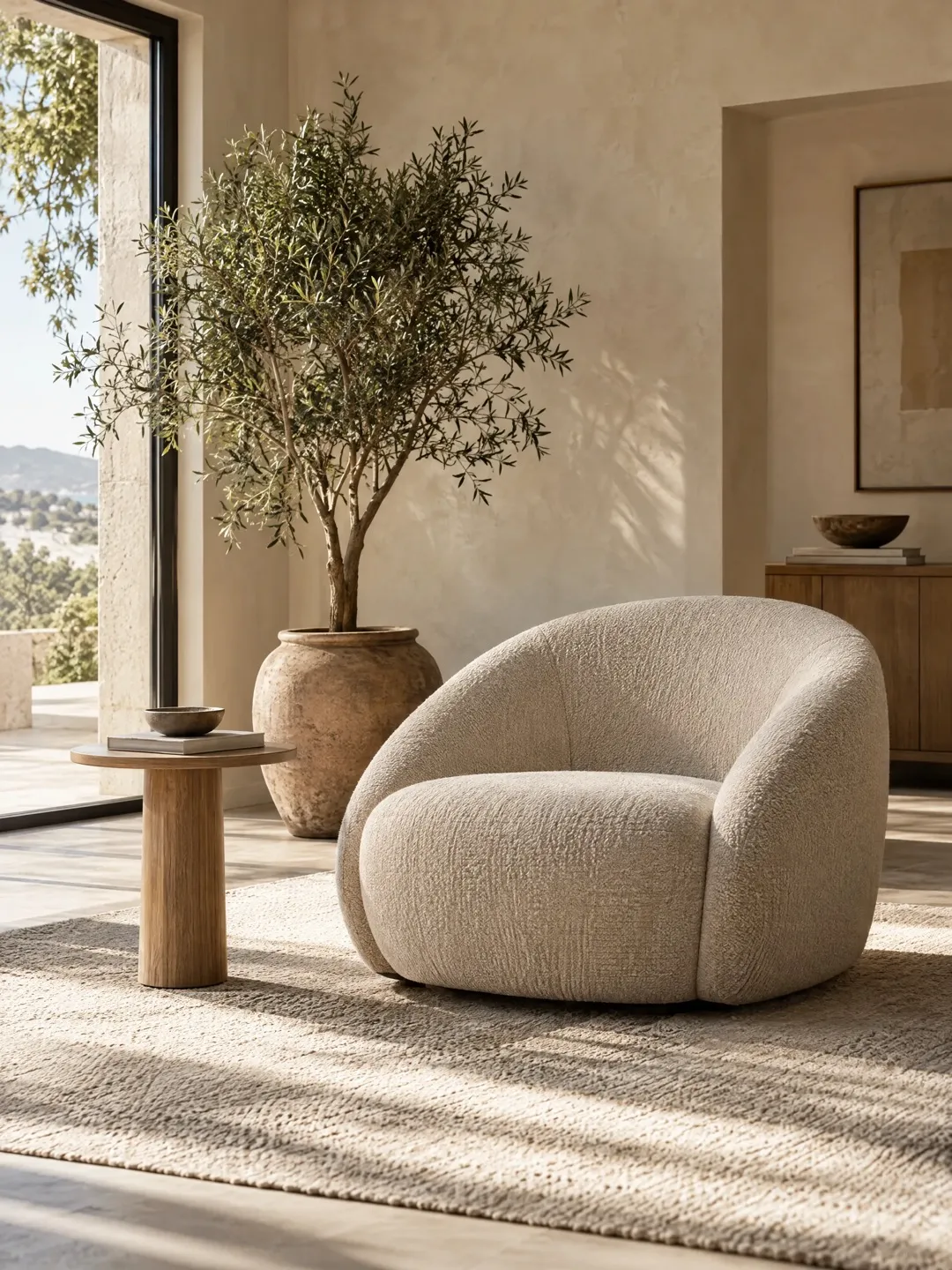
- Input
- 1 to 8 product photos (PNG, JPG, WebP or HEIC)
- Outputs
- Still images and short videos
- Formats
- Stills 3:4 by default; video 9:16, 1:1 or 16:9
- Model
- None, stock, your own photo, or described
Scale and room context
Furniture is big, heavy and expensive to photograph. A traditional shoot needs a large studio or a dressed room set, props, and a crew to move pieces between scenes. That is why many sellers only have a single cut-out photo per product.
Buyers, though, need context. A sofa on white tells you its shape but not whether it will dominate a living room. Room scenes answer that, as long as the scale is honest. A chair photographed with a wide lens close up can look larger than it is, and furniture shown in a room with oversized windows or short doors can mislead. Materials matter too: wood grain, upholstery weave, boucle, velvet pile and metal legs all need light that shows texture, and fabric colours drift under warm indoor light.
The shot list for furniture and decor
Most furniture pages combine cut-out shots, which show the product clearly, with room scenes, which show it in use. Shoot from roughly seated eye level for chairs and sofas, as a high angle makes them look squat.
- Front packshot on a plain background.
- Three-quarter angle, the most common hero view for chairs and sofas.
- Side and back views.
- Material close-ups: upholstery, wood grain, joints and legs.
- Room scene showing the piece with matching decor.
- A shot with a person seated or nearby for scale.
- For lamps, both lit and unlit views.
Home decor and formats
Smaller decor, such as vases, cushions, throws, rugs and candles, follows the same rules at a smaller scale. Rugs need a top-down view and a close-up of the pile. Cushions need to look plumped. Vases and ceramics need side light for glaze. Lamps should be shown on and off, since the light they give is part of the product.
Many marketplaces ask for a plain white main image; check current rules. Room scenes suit 16:9 banners and 3:4 feed posts, and a 9:16 video moving slowly around a room scene works for Reels and Shorts. Flash Shoot makes 3:4 stills by default and videos in 9:16, 1:1 or 16:9.
Keeping AI room scenes honest
An AI room scene places the piece in a room the model imagines, so the size of the piece relative to the room is a judgement, not a measurement. Check proportions against the real dimensions: seat height against a person, a sofa against a doorway, a lamp against a side table. State the real dimensions in the listing.
Check the leg shape and count, cushion count, seams and piping, wood colour and fabric colour. Upload references of the whole piece in even daylight, plus a close-up of the material. AI cannot invent a back or underside it has not seen accurately, so include the views you want back.
Furniture shot list with placements
| Shot | What it shows | Best format |
|---|---|---|
| Front packshot | Shape and colour | Main listing image on white |
| Three-quarter view | Depth and overall form | Listing gallery, 3:4 feed post |
| Material close-up | Fabric, grain, finish | Listing gallery |
| Room scene | Style and size in a space | 16:9 banner, 3:4 feed post |
| Person for scale | Seat height and real size | Listing gallery |
| Slow room video | The piece in context | 9:16 video for Reels and Shorts |
How to do it in Induce AI
Upload the piece
Add 1 to 8 photos of the whole piece in even light: front, three-quarter, side, back and a material close-up.
Choose the model option
Pick no model for packshots and room scenes, or a stock, uploaded or described model to show a person seated for scale.
Set background and light
Choose a plain studio background or a room setting, and a light direction, such as window light from one side.
Generate stills and videos
Generate 3:4 stills and a 16:9 or 9:16 video, with up to 4 variants per output to compare room styles.
Review and download
Check proportions against the real dimensions, plus legs, cushions, seams and colour, then download.