Sarees & ethnic wear
AI saree photography and AI product photography for ethnic wear
To make saree product photos with AI, upload 1 to 8 photos of the saree to Flash Shoot in Induce AI: opened out to show the body, border and pallu, plus close-ups of the weave or zari. Choose a stock model, your own model photo or a described model, set the background and light, and generate draped stills and short videos. Check the border, pallu and colour against the real saree before you publish.
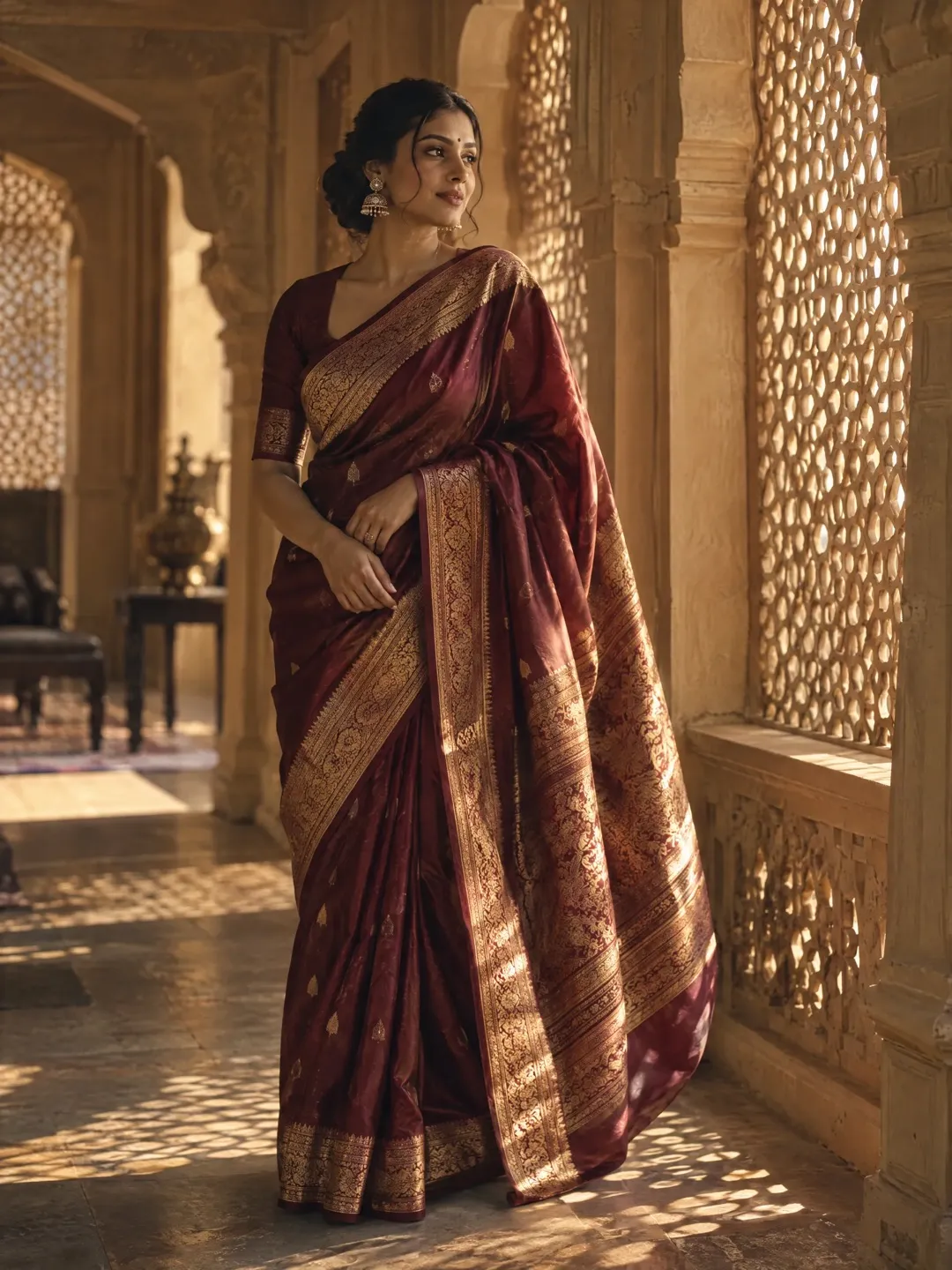
- Input
- 1 to 8 product photos (PNG, JPG, WebP or HEIC)
- Outputs
- Still images and short videos
- Formats
- Stills 3:4 by default; video 9:16, 1:1 or 16:9
- Model
- None, stock, your own photo, or described
What makes sarees hard to photograph
A saree is several metres of unstitched fabric, and almost none of it shows when it is folded on a shelf. Buyers want to see three things: the body of the saree, the border, and the pallu that falls over the shoulder. A good drape shows all three, with neat, even pleats at the front and the pallu spread or pleated so its design is visible.
Draping takes skill and time for every saree, which is why catalogue shoots for ethnic wear are slow. Fabric adds to the difficulty. Silk has a sheen that changes with the angle of light. Zari, the metallic thread in many borders, reflects like jewellery and can blow out or go dull. Handloom weaves and prints carry fine motifs that buyers inspect closely. And colour matters more than almost anywhere else, because a saree is often bought to match a blouse, an occasion or a family event.
The shot list for a saree or ethnic wear listing
Saree listings usually lead with the full drape and then show each part of the fabric in detail. Buyers often scroll straight to the border and pallu, so give those their own images.
- Full-length draped on-model shot, front view.
- Back view showing how the pallu falls.
- Pallu close-up, spread to show its design.
- Border close-up, including zari work.
- Fabric or weave macro of the body of the saree.
- Blouse piece, if included.
- Folded saree on a plain background.
- A short video of the model turning or walking, to show the fall of the fabric.
Lehengas, kurtas and festive formats
Other ethnic wear has its own needs. Lehengas need a full-length shot that shows the flare of the skirt and the dupatta, plus close-ups of embroidery. Kurta sets need the kurta, bottom and dupatta visible together. Sherwanis and men’s kurtas need the buttons, collar and embroidery in detail.
Festive and wedding seasons drive much of the demand, and ads move to Reels and Shorts. A 9:16 video of a saree in motion works well there. Use 3:4 stills for store pages and feed posts, and 16:9 for sale banners. Flash Shoot makes 3:4 stills by default and videos in 9:16, 1:1 or 16:9. Many marketplaces set rules for ethnic wear images, such as a plain background or the product shown worn, so check their current guidelines.
What to check on AI saree photos
Border motifs, pallu designs and zari patterns are exactly the detail an AI image can simplify or redraw. Compare each output with the real saree: motif shape and spacing, border width, pallu layout, zari colour, and the colour of the body in daylight. Buyers of handloom and silk sarees look closely, and a changed motif is a different saree.
Check that the drape is one the saree can really be worn in and that the pallu shown is the actual pallu, not a repeat of the body. Upload references with the saree opened out in daylight, the pallu and border flat, and a close-up of the weave. If you have a photo of it draped, add it.
Saree shot list with placements
| Shot | What it shows | Best format |
|---|---|---|
| Full drape, front | Overall look, pleats, colour | Main store image, 3:4 feed post |
| Back view with pallu | How the pallu falls | Listing gallery |
| Pallu spread | Pallu design in full | Listing gallery |
| Border and zari close-up | Border width, motifs, metallic work | Listing gallery |
| Weave macro | Fabric quality and texture | Listing gallery |
| Model turning or walking | Fall and movement of the fabric | 9:16 video for Reels and Shorts |
| Festive scene | Occasion and styling | 16:9 sale banner, 3:4 feed post |
How to do it in Induce AI
Upload the saree
Add 1 to 8 photos in daylight: the saree opened out, pallu and border laid flat, a weave close-up and the blouse piece.
Choose the model option
Pick a stock model, upload your own model photo or describe a model to wear the saree.
Set background, light and pose
Choose a plain background for store pages or a festive setting for ads, a soft light direction for the silk, and a pose that shows the pallu.
Generate stills and videos
Generate 3:4 draped stills and a 9:16 video for Reels and Shorts. Use Flash Films for a short festive ad with music and captions.
Review and download
Check border motifs, pallu, zari and colour against the real saree before downloading.